Best used GPU vs best new midrange GPU for local AI in 2026
Used Ampere flagship at half the price of new equivalents. The 24 GB leverage buy.
- VRAM
- 24 GB
- Bandwidth
- 936 GB/s
- TDP
- 350 W
- Price
- $700-1,000 (2026 used)
16 GB Blackwell midrange new with warranty. The 'safe new' alternative to used silicon.
- VRAM
- 16 GB
- Bandwidth
- 896 GB/s
- TDP
- 300 W
- Price
- $750-900 (2026 retail)
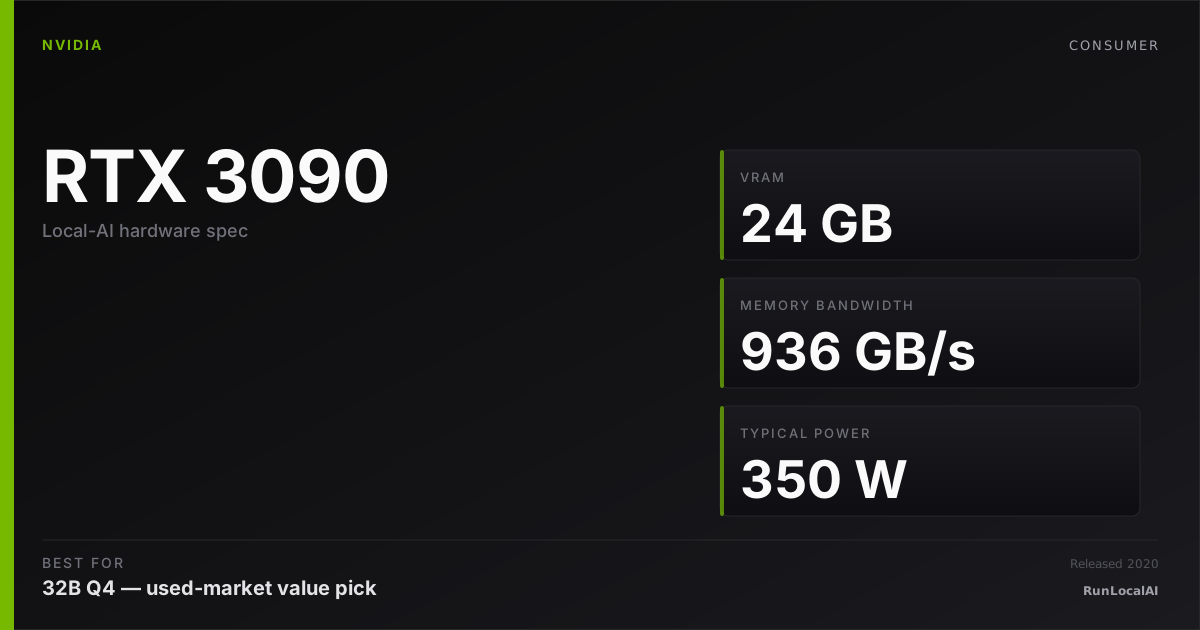
Best used GPU (RTX 3090 reference)
Used Ampere flagship at half the price of new equivalents. The 24 GB leverage buy.
New midrange GPU (RTX 5070 Ti reference)
16 GB Blackwell midrange new with warranty. The 'safe new' alternative to used silicon.
At similar price ($700-900), this is the single most-asked 2026 buyer decision: used RTX 3090 (24 GB Ampere, $700-1,000 used) vs new RTX 5070 Ti (16 GB Blackwell, $750-900 retail). Different generation, different VRAM ceiling, different risk profile.
Used 3090 wins on: VRAM (24 GB > 16 GB unlocks 70B Q4 + FP16 13B + multi-model serving), bandwidth (close — 936 GB/s vs 896 GB/s), $/GB-VRAM (~$33/GB vs ~$50/GB). Loses on: warranty, age, mining-rig provenance risk, lower compute, no FP8 native, higher power.
RTX 5070 Ti wins on: warranty, day-zero new-model-wheel support, FP8 native, lower power, modern Blackwell efficiency. Loses on: VRAM ceiling (the dimension that decides 70B viability).
For most local-AI buyers, the answer is: used 3090 unless used silicon is a hard dealbreaker. The VRAM advantage at this tier is decisive.
Who wins each workload
Each row is a workload local-AI operators actually run. Verdicts derived from VRAM math + bandwidth — no editorial hand-wave.
What each card actually runs
VRAM math against a canonical set of popular models. The largest context window that fits with headroom appears in each cell.
| Model | Best used GPU (RTX 3090 reference) | New midrange GPU (RTX 5070 Ti reference) |
|---|---|---|
Qwen 3 14B Q4_K_M 14B params · Q4_K_M | 32K ctx | 16K ctx, tight |
Qwen 3 32B Q4_K_M 32B params · Q4_K_M | 4K ctx, tight | OOM |
Llama 3.3 70B Q4_K_M 70B params · Q4_K_M | OOM | OOM |
DeepSeek R1 distill 32B 32B params · Q4_K_M | 2K only | OOM |
Mixtral 8x22B Q4 141B params · Q4_K_M | OOM | OOM |
FLUX.1 image gen 12B params · FP16 | OOM | OOM |
Llama 3.3 70B Q4_K_M
Computed from each option's sustained TDP × predicted tok/s at $0.16/kWh. Cloud baseline: Claude Sonnet 4.6 (input + output).
Electricity-only cost — excludes the upfront hardware purchase, cooling, and amortized component depreciation. Hardware ROI math lives at /cost-vs-cloud; this line is for "is the marginal token cheaper than Claude?" not "should I buy this rig instead of paying Anthropic." MODELED ESTIMATE.
Quick decision rules
Operational matrix
| Dimension | Best used GPU (RTX 3090 reference) Used Ampere flagship at half the price of new equivalents. The 24 GB leverage buy. | New midrange GPU (RTX 5070 Ti reference) 16 GB Blackwell midrange new with warranty. The 'safe new' alternative to used silicon. |
|---|---|---|
VRAM The dimension that decides 70B-class viability. | Strong 24 GB GDDR6X. 70B Q4 + FP16 13B + multi-model headroom. | Limited 16 GB GDDR7. 13-32B Q4 comfortable; 70B Q4 short-context only. |
Memory bandwidth Decode speed. | Strong 936 GB/s GDDR6X. | Strong 896 GB/s GDDR7. ~5% lower than 3090 — effectively tied. |
Compute (FP16/FP8) Prefill + image-gen workload throughput. | Acceptable ~35 TFLOPS FP16. No FP8. | Strong ~78 TFLOPS FP16 + FP8 native. ~2× compute advantage. |
Power draw Sustained-load wall power. | Limited 350W TDP; runs hot under sustained load. | Strong 300W TDP; Blackwell efficiency real. |
Price (2026) Acquisition cost. | Excellent $700-1,000 used. Best $/GB-VRAM at 24 GB tier. | Strong $750-900 retail with warranty. |
Warranty + risk What happens when it fails. | Limited None. Buyer beware on used silicon, especially ex-mining. | Excellent Standard 3-year manufacturer warranty. |
Software stack maturity Driver / CUDA / runtime stability. | Excellent Mature Ampere; 5+ years of bug fixes shipped. | Strong Solid Blackwell in 2026; ~12 months of stability. |
Multi-GPU economics Cost when scaling to 48 GB+. | Excellent Two 3090s = 48 GB for ~$1,800 used. | Limited Two 5070 Tis = 32 GB for ~$1,700. Less VRAM, similar money. |
Tiers are qualitative editorial labels, not derived from a single benchmark. For tok/s and VRAM measurements on these cards, browse the corpus or request a benchmark.
Who should AVOID each option
Avoid the Best used GPU (RTX 3090 reference)
- If you can't tolerate buying used silicon (psychology, warranty needs)
- If your daily workload caps at 13-32B Q4 (5070 Ti is enough)
- If FP8 native + Blackwell efficiency matter for your workflow
Avoid the New midrange GPU (RTX 5070 Ti reference)
- If 70B Q4 at usable context is your roadmap (16 GB blocks you)
- If multi-GPU scaling is on the roadmap (3090 wins decisively)
- If $/GB-VRAM is the dominant axis (3090 is ~30% better)
Workload fit
Best used GPU (RTX 3090 reference) fits
- 70B Q4 inference at 4-8K context
- Multi-GPU homelab path
- Best $/GB-VRAM at the 24 GB tier
New midrange GPU (RTX 5070 Ti reference) fits
- 13-32B Q4 inference + image gen
- First-time buyers wanting new + warranty
- Power-efficient single-card builds
Reality check
The VRAM gap (24 GB vs 16 GB) is the dimension that decides 95% of buyer decisions at this tier. Most other axes are close.
Most 'I bought new midrange and regret it' stories come from users who thought 16 GB would be enough and discovered 70B Q4 is a hard ceiling.
Most 'I bought used 3090 and regret it' stories come from users who got an ex-mining card with poor thermals and didn't replace thermal pads. Diligence matters.
If you can't tolerate buying used silicon, just accept the 16 GB tier and pick the new card. Don't try to talk yourself into used 3090 if warranty is non-negotiable for your psychology.
Used-market notes
- Used 3090 sourcing: avoid sellers refusing to demo under load. 30-min stress test (e.g., LLM inference at 90%+ utilization) screened with screen recording is the diligence baseline.
- Check ECC error counts: `nvidia-smi --query-gpu=ecc.errors.uncorrected.aggregate.total --format=csv`. Any value > 100 = walk away.
- Replace thermal pads on any used 3090 older than 18 months. ~$30 + 1 hour gives you 5-10°C cooler operation.
- Mining-rig cards: not inherently bad. Mining wears fans (replaceable) and thermal pads (replaceable), rarely silicon. Verify no aggressive overclocks were applied.
Power, noise, and heat
- 3090 sustained inference: 320-350W actual draw, 75-85°C on AIB designs, audibly loud under continuous load. Reference cooler is hot+loud; AIB designs (EVGA FTW3, ASUS Strix) better.
- 5070 Ti sustained: 270-300W actual draw, 65-72°C, quieter than 3090 at equivalent throughput.
- Annual electricity (4hrs/day): 3090 ~$80/year, 5070 Ti ~$60/year. Marginal but real over 3-5 years.
- Both cards 3-slot designs typically. Multi-GPU spacing tight in standard ATX cases.
Where to buy
Where to buy Best used GPU (RTX 3090 reference)
Editorial price range: $700-1,000 (2026 used)
Where to buy New midrange GPU (RTX 5070 Ti reference)
Editorial price range: $750-900 (2026 retail)
Affiliate links — no extra cost. Prices are editorial ranges, not real-time. Click through to verify.
Some links above are affiliate links. We may earn a commission at no extra cost to you. How we make money.
Editorial verdict
For 70-80% of buyers at this price tier, used 3090 is the right call. 24 GB VRAM unlocks workloads that 16 GB can't reach — 70B Q4 + FP16 13B + multi-model serving + image-gen with concurrent LLM. The diligence cost (stress test, ECC check, thermal pad replacement) is real but small.
Buy 5070 Ti only if (a) used silicon is a hard dealbreaker for your psychology, (b) your workload demonstrably caps at 13-32B Q4, AND (c) you value FP8 native + Blackwell efficiency for specific reasons. Otherwise the VRAM gap decides for the 3090.
Multi-GPU operators should not even consider this question. Used 3090 wins decisively on tensor-parallel scaling at the 48 GB combined VRAM tier.
First-time buyers learning the stack often default to new + warranty (5070 Ti). That's defensible. Just understand what you're paying for: peace of mind, not capability.
HonestyWhy benchmark numbers on this page might not reflect your real experience
- tok/s is not user experience. Humans read at ~10-15 tok/s — anything above that is buffer time, not perceived speed.
- Context length changes everything. A 70B Q4 model at 1024 tokens generates ~25 tok/s; the same model at 32K context drops to ~8-12 tok/s as KV cache fills.
- Quantization changes the conclusion. Q4_K_M vs Q5_K_M vs Q8 produce different speed AND different quality. A benchmark at one quant doesn't translate to another.
- Thermal throttling changes long sessions. The first 15 minutes of a benchmark see boost-clock peak; the next 4 hours see steady-state, which is 5-15% slower depending on case airflow.
- Driver and runtime versions silently shift winners. A 2024 benchmark on PyTorch 2.4 + CUDA 12.4 doesn't reflect 2026 reality on PyTorch 2.6 + CUDA 12.6. Discount benchmarks older than 6 months.
- Vendor and YouTuber benchmarks are cherry-picked. The standard 'Llama 3.1 70B Q4 at 1024 tokens' chart shows peak decode on a tiny prompt — exactly the conditions least representative of daily use.
- A 25-30% throughput gap between two cards rarely translates to a 25-30% experience gap. Both cards are fast enough; the differentiator is usually VRAM ceiling, not raw decode speed.
We try to surface these caveats where they apply. If a number on this page reads more confident than it should, please email us via contact. See also our methodology and editorial philosophy.
Don't see your specific workload?
The matrix above is editorial. If you want a measured tok/s number for a specific model + quant on either card, file a benchmark request — the community claims requests and reproduces them under our methodology checklist.