Apple M3 Ultra
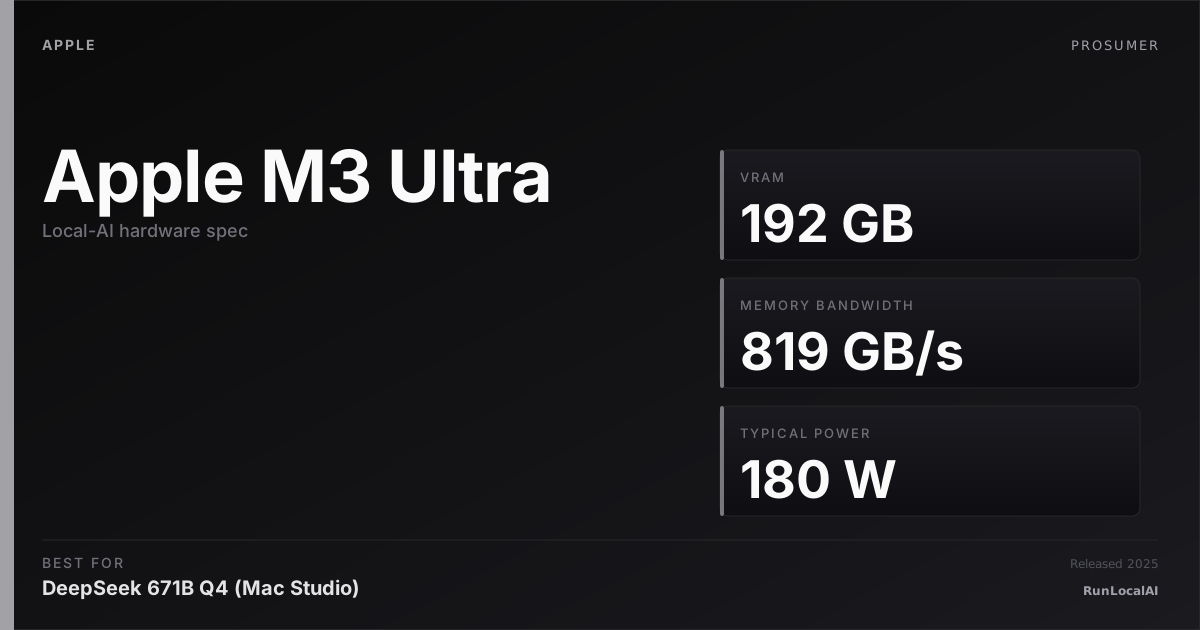
M3 Ultra — up to 512GB unified in Mac Studio top spec. 819 GB/s bandwidth.
Affiliate disclosure: as an Amazon Associate and partner of other retailers, we earn from qualifying purchases. The verdict on this page is our editorial opinion; affiliate links never influence what we recommend.
Sub-scores sum to 745 / 1000. Headline = 745 × 0.70 (Estimated-confidence discount) = 522. This is an algorithmic performance-tier score — distinct from, and often lower than, the editorial “Our verdict” below, which weighs value and real-world fit (especially for hardware we haven’t measured yet). How scoring works →
Extrapolated from 800 GB/s bandwidth — 112.0 tok/s estimated. No measured benchmarks yet.
Plain-English: Runs 70B comfortably — snappy enough for a coding agent; vision models supported.
Verdicts extrapolated from catalog VRAM + bandwidth + ecosystem flags. Hover any chip for the rationale. Want measured numbers? Submit your own run with runlocalai-bench --submit.
What it does well
The Apple M3 Ultra is Apple's flagship desktop SoC for Mac Studio M3 Ultra (the only product shipping with this chip) — 32 CPU cores (24 performance + 8 efficiency) + 80 GPU cores + 32-core Neural Engine + up to 192 GB unified memory at 819 GB/s bandwidth. The chip is built from two M3 Max dies fused via Apple's UltraFusion interconnect (proprietary 2.5 TB/s on-package fabric). For local AI: 192 GB unified memory at 819 GB/s lets a single Mac Studio M3 Ultra fit Llama 3.3 405B at Q4 with full context, DeepSeek V3 671B at Q3, or Qwen 3 235B at FP8 — workloads no NVIDIA consumer card can match on memory ceiling. MLX is genuinely faster than llama.cpp Metal for many workloads; Apple's framework matures continuously. Power draw caps at 480 W under sustained load — meaningfully less than equivalent NVIDIA workstation tier. The platform is silent, professional-grade, and integrated.
Where it breaks
- No CUDA — full stop. Same fundamental constraint as all Apple Silicon. vLLM, SGLang, TensorRT-LLM — none run.
- Bandwidth ceiling vs NVIDIA frontier. 819 GB/s is well below H200's 4.8 TB/s, B200's 8 TB/s. For long-context decode at the frontier scale, NVIDIA wins on bandwidth.
- Single-product platform. M3 Ultra ships only in Mac Studio. No laptop M3 Ultra, no third-party variants.
- Architecture is one generation behind M4. Apple shipped M4 Pro and M4 Max in late 2024; M3 Ultra hasn't been refreshed with M4 silicon as of 2026. The "next-gen Mac Studio Ultra" with M4 Ultra silicon would be the architectural successor.
- Thunderbolt 5 + Mac mini Studio + Pro Display XDR ecosystem expectation. This chip is Apple's Pro tier — the surrounding hardware (display, peripherals, AppleCare) costs add up to $7,000+ all-in.
Ideal model range
- Sweet spot: 200B-235B class production inference single-machine — fits 192 GB at FP8 with comfortable context.
- Sweet spot: 405B Q4 / Q5 single-machine inference — the frontier of single-node prosumer AI.
- Sweet spot: Mixed-model agentic workflows fitting up to 192 GB simultaneously — multiple 70B + 14B + embedding models.
- Sweet spot: Local development on frontier-scale models that ship to NVIDIA production clusters.
- Sweet spot: Silent, professional-grade workstation deployment where 480 W vs 1000+ W matters.
- Bad fit: CUDA-locked stacks, production multi-tenant serving, frontier training.
Bad use cases
- CUDA-locked stacks. Don't fight the ecosystem. Pick NVIDIA workstation.
- Production rack inference. Wrong tier — use NVIDIA datacenter.
- Maximum tok/s on smaller models. Consumer NVIDIA cards win on 13B-class throughput.
- Cost-conscious 192 GB seekers. Multi-card NVIDIA / AMD homelab is cheaper $/VRAM but more complex.
- Anyone needing native FP4 / Transformer Engine 2. Apple Silicon doesn't have these architecture-specific features.
Verdict
Buy this (in Mac Studio M3 Ultra form) if you want a single silent professional workstation that runs frontier-scale local AI (200B+ at FP8, 405B+ at Q4), you can pay the Apple premium for unified-memory architecture, and your stack is MLX/llama.cpp-Metal-compatible. M3 Ultra is the chip; Mac Studio is the system — see the Mac Studio M3 Ultra verdict for full system-level analysis.
Skip this if your software stack requires CUDA, you're cost-sensitive (multi-card NVIDIA homelab is cheaper $/VRAM), you primarily need throughput on small models, or you're locked into a Linux-centric workflow.
How it compares
- vs M4 Max → M4 Max is the next-gen architecture in MacBook Pro 16 form at up to 128 GB unified memory. M3 Ultra has 50% more memory ceiling (192 GB) at higher bandwidth, in desktop form factor. Pick M3 Ultra for desktop frontier; M4 Max for laptop portability.
- vs Apple M2 Ultra → M2 Ultra was the prior-gen flagship Mac Studio chip at up to 192 GB unified memory at lower bandwidth (~800 GB/s). M3 Ultra is the architecturally-current refresh.
- vs M4 Ultra (speculative) → If/when Apple ships M4 Ultra in a future Mac Studio, expect 256+ GB unified memory and ~1 TB/s bandwidth. M3 Ultra is the current-shipping flagship.
- vs NVIDIA RTX PRO 6000 Blackwell (96 GB) → PRO 6000 Blackwell wins on bandwidth (1.79 TB/s) + CUDA + tensor compute, with 50% less memory ceiling. M3 Ultra wins on memory + silence + integrated workstation. Pick by ecosystem and memory priorities.
Overview
What the Apple M3 Ultra actually is, in local-AI terms
The Apple M3 Ultra is the only realistic single-machine path to running 70B-class and 100B-class models at FP16 outside a datacenter in 2026. Up to 192 GB of unified memory, ~800 GB/s memory bandwidth, and a fanless-by-default Mac Studio chassis that draws under 300 W under sustained inference load. There is nothing else like it in the consumer or prosumer hardware market.
The trade is real and matters: the M3 Ultra is memory-bandwidth-rich and compute-poor relative to a CUDA card. A 4090 has higher compute throughput per dollar; a 192 GB Ultra has higher memory capacity per dollar by a wide margin. For workloads where VRAM capacity is the binding constraint — and large-model inference is precisely such a workload — the Ultra is a better buy than any single CUDA card on the market.
Where it fits in the hardware ladder
The 2026 Apple Silicon inference ladder, in order of "what model class can it host":
| Chip | Mem (max) | Realistic ceiling |
|---|---|---|
| M3 / M4 (base) | 24 GB | 7B-class |
| M-series Pro | 36-48 GB | 13B-class |
| M-series Max | 64-128 GB | 32B-class comfortably |
| M3 Ultra | 192 GB | 70B-class FP16 / 100B-class 4-bit |
vs single-card NVIDIA:
| Card | VRAM | 70B FP16? |
|---|---|---|
| RTX 4090 | 24 GB | no |
| RTX 5090 | 32 GB | no |
| RTX A6000 | 48 GB | no |
| H100 SXM | 80 GB | no |
| H200 | 141 GB | yes (tight) |
| M3 Ultra (192 GB) | 192 GB | yes, comfortably |
The closest single-machine alternative is a Mac Pro M2 Ultra (192 GB) or H200, both substantially more expensive than the Mac Studio M3 Ultra at the same memory tier.
Best use cases
- 70B FP16 single-user inference. Llama 3.1 70B at FP16 fits with multi-tens-of-GB headroom.
- 100B-class 4-bit inference. DeepSeek V3 and similar at 4-bit MLX quants.
- Quiet inference workstation. A Mac Studio M3 Ultra is silent under sustained inference load. CUDA cards are not.
- Local agentic stacks. Pair with MLX-LM and the same memory + tool layer as /stacks/local-coding-agent.
- Mac-native development. When the rest of the dev environment is macOS, an Ultra Mac Studio collapses the workflow into one machine.
See /stacks/multi-machine-apple-cluster for scaling beyond a single Ultra.
What it can run
| Model class | Quant | Context | Notes |
|---|---|---|---|
| 7B | F16 / BF16 | 32K | trivial |
| 13B | F16 | 32K | trivial |
| 32B | F16 | 32K | comfortable |
| 32B | MLX-4bit | 64K+ | trivial |
| 70B | F16 | 16-32K | the headline use case |
| 70B | MLX-4bit | 32K+ | comfortable |
| 100B-class | MLX-4bit | 16K | possible |
The ceiling is the 192 GB unified memory budget minus OS / apps (call it ~170 GB for AI). The practical floor is decode tokens-per-sec — Apple Silicon's compute-per-watt is excellent, but compute-per-second-absolute trails a 4090 by ~30-50 % depending on model and quant.
OS support
| OS | Quality |
|---|---|
| macOS Sonoma+ | excellent (only target) |
| Asahi Linux on M3 | research-grade — not for serious AI work |
| Anything else | unsupported |
Software / runtime support
Apple Silicon-native or nothing:
- MLX-LM — the highest-throughput Apple-native engine; recommended default
- llama.cpp + Metal — well-tested cross-platform option; ~15-30 % slower than MLX on the same model
- Ollama — wraps llama.cpp; the friendliest UX path
- LM Studio — full-GUI path with both MLX and llama.cpp backends
- PyTorch MPS — Apple Silicon backend; usable for fine-tuning small models
CUDA, ROCm, AWQ, GPTQ, EXL2, FP8 transformer engine — none of these exist on Apple Silicon. The format world is MLX-4bit / MLX-8bit / GGUF / FP16-FP32. See /systems/quantization-formats.
What breaks first
- Memory bandwidth ceiling. Apple Silicon is bandwidth-rich vs a CPU but compute-poor vs a 4090. Decode tokens-per-sec on big models will trail equivalent CUDA setups; the 192 GB capacity is what you're paying for, not raw speed.
- Unified memory swapping to disk. macOS swaps unified memory to SSD silently when overcommitted. The model "still runs" but tokens-per-sec collapses to ~1. Budget memory carefully. See /errors/metal-out-of-memory.
- Hot-loaded model count. Loading two large models simultaneously will swap unless you have meaningful headroom; plan for one model in residence at a time.
- MoE routing on Apple Silicon. Compute-poor → MoE models that activate many experts per token punish Apple Silicon harder than NVIDIA.
- No NVLink / NCCL equivalent. Multi-Mac inference is possible (see Exo Labs Cluster and the multi-Mac stack) but networked, not bus-attached. Latency profile differs from multi-GPU.
Alternatives by intent
| If you want… | Reach for |
|---|---|
| Same VRAM tier, NVIDIA datacenter | H200 — much faster, much more expensive |
| Same form factor, less memory | Apple M4 Max MacBook (128 GB max) |
| Lower memory but higher throughput | RTX 4090 ×2 |
| Multi-Mac scale-out | /stacks/multi-machine-apple-cluster |
Best pairings
- MLX-LM + Llama 3.1 70B FP16 — the canonical 70B local inference setup outside a datacenter
- MLX-LM + Qwen 2.5 72B 4-bit — the agentic-stack default for Mac-native operators
- Open WebUI running on the Ultra Mac Studio + MLX-LM server backend — silent homelab chat host
- macOS Sonoma+ + 10 GbE for multi-Mac clusters
Who should avoid the M3 Ultra
- Operators on non-macOS dev environments. CUDA / ROCm tools are richer.
- Workloads dominated by prefill latency at scale. vLLM on H100 wins decisively.
- Multi-tenant production serving with concurrent users. MLX-LM is single-stream-tuned; vLLM on H100 is the answer.
- Operators who need bleeding-edge model architectures the day they release. MLX often lags llama.cpp by 1-3 months on novel architectures.
- Anyone for whom price-per-tok-per-sec is the dominant metric. The 4090 wins that ratio for 32B-and-below.
Related
- Stacks: /stacks/multi-machine-apple-cluster, /stacks/local-coding-agent
- System guides: /systems/quantization-formats, /setup
- Tools: MLX-LM, llama.cpp, Ollama
- Errors: /errors/metal-out-of-memory
Some links above are affiliate links. We may earn a commission at no extra cost to you. How we make money.
Specs
| VRAM | 0 GB |
| System RAM (typical) | 192 GB |
| Power draw (peak) | 180 W |
| Released | 2025 |
| Backends | Metal MLX |
Hardware worth comparing
The closest alternatives by price, memory bandwidth, and form factor, plus a step up and down — so you can frame the buying decision against real options.
M3 Ultra Mac Studio with 192+ GB unified memory is the path to 100B+ class inference without multi-card complexity. The Mac-specific guides below frame the buyer decision.
Frequently asked
Does Apple M3 Ultra support CUDA?
Where next?
Reviewed by RunLocalAI Editorial. See our editorial policy for how we research and verify hardware specifications.