NVIDIA GeForce RTX 4090
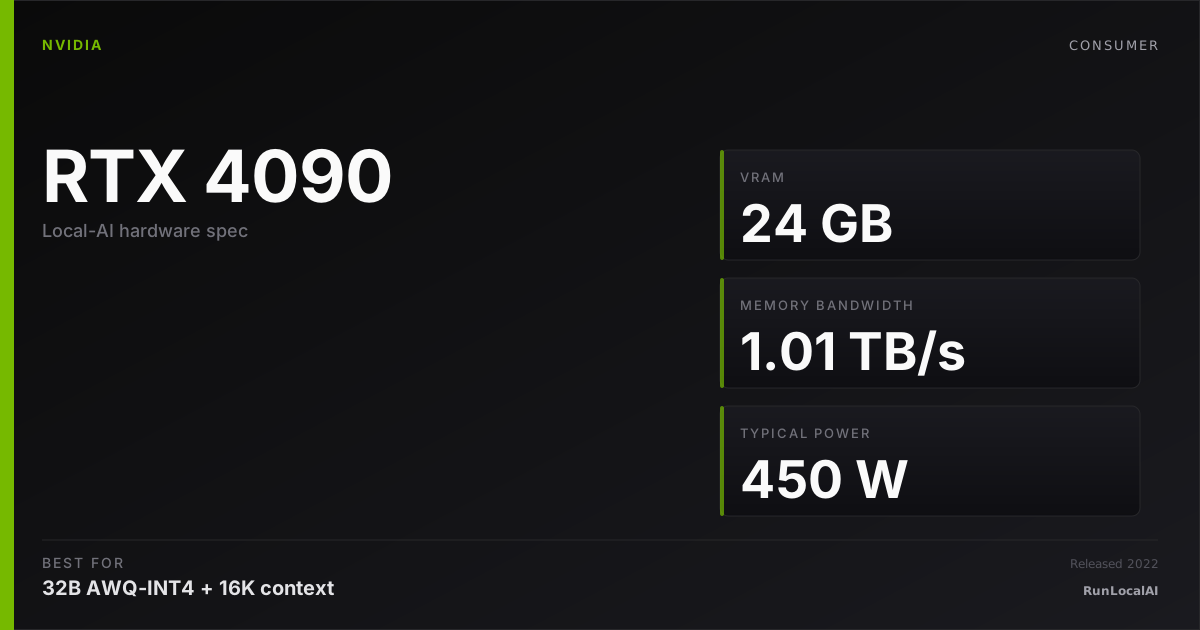
24 GB GDDR6X at about 1 TB/s. Check 32B Q4 models against your context budget; 70B Q4 weights exceed this card’s memory and require offload or multiple GPUs.
Affiliate disclosure: as an Amazon Associate and partner of other retailers, we earn from qualifying purchases. The verdict on this page is our editorial opinion; affiliate links never influence what we recommend.
Sub-scores sum to 743 / 1000. Headline = 743 × 0.70 (Estimated-confidence discount) = 520. This is an algorithmic performance-tier score — distinct from, and often lower than, the editorial “Our verdict” below, which weighs value and real-world fit (especially for hardware we haven’t measured yet). How scoring works →
Extrapolated from 1008 GB/s bandwidth — 121.0 tok/s estimated. No measured benchmarks yet.
Plain-English: Workable at 32B, comfortable at 14B and below — snappy enough for a coding agent; vision models supported.
Verdicts extrapolated from catalog VRAM + bandwidth + ecosystem flags. Hover any chip for the rationale. Want measured numbers? Submit your own run with runlocalai-bench --submit.
What it does well
The RTX 4090 provides 24 GB GDDR6X at about 1 TB/s. A 32B Q4_K_M model has about 19.3 GB of weights, leaving limited space for KV cache and runtime. A 70B Q4_K_M model needs about 42.3 GB of weights and cannot reside fully in one 4090. Check published benchmark configurations for speed; the earlier unlinked timing ranges have been removed.
Where it breaks
- 70B Q4 needs offload or multiple GPUs. Its weights alone exceed 24 GB. System RAM and the offload split change both memory use and speed.
- Large MoE models need total-weight capacity. Active parameter count is not the memory needed to hold all experts.
- Power and thermals. The GPU rating is 450 W; allow for the rest of the system and transient loads.
Ideal model range
- Single-card starting point: 32B Q4 at a checked context; 7B–14B quantized models leave more headroom.
- 70B Q4: about 42.3 GB of weights before runtime and KV cache. A single RTX-4090 needs offload. Two 24 GB cards can be viable with a supported split and a constrained context budget.
- FP16: 32B needs about 64 GB of weights; 70B needs about 140 GB. Reserve additional space before selecting a memory tier.
- Concurrency and long context: measure the actual model, cache dtype and runtime. No fixed context or timing guarantee is made here.
Bad use cases
- Genuine 100B+ MoE workloads (DeepSeek V3, Llama 4 Maverick) — workstation hardware required.
- Maximum tok/s on tiny models — for sub-7B at >200 tok/s, integrated solutions and lower-end cards are better $/throughput.
- Workstation reliability over years — the 4090 has consumer warranty terms; sustained 24/7 inference is technically out-of-spec.
Verdict
Consider a 4090 if a 24 GB CUDA card meets your measured workload needs and its price is reasonable against current alternatives.
Choose more memory if 70B Q4 is your daily target. A 5090 adds memory but still cannot hold 70B Q4_K_M fully on one card. Compare a supported multi-GPU setup or a larger-memory device, and check the model and context before buying.
How it compares
- RTX 3090 / RTX 4090: both provide 24 GB. The 4090 has higher specified bandwidth; a matched benchmark is needed for a throughput comparison.
- RTX 5090: 32 GB and about 1.79 TB/s. It adds context headroom for 32B Q4, but 70B Q4_K_M still exceeds its memory.
- Two RTX 3090s: 48 GB nominal memory with a supported split. This can be viable for 70B Q4, with limited context room and additional system, power and cooling requirements.
- 16 GB GPUs: start by checking 13B–14B Q4 models. A 32B Q4_K_M artifact is about 19.3 GB before overhead.
- Apple M4 Max 128 GB: more total memory, shared with the OS. It does not hold 70B FP16 weights of about 140 GB. Consider Q4/Q8 and check available unified memory. A 192 GB or larger configuration provides a different FP16 budget.
- Workstation GPUs: 48–96 GB on one card can simplify larger model allocations, at a different price and power level.
›Why this rating
9.4/10 — the consumer card every local-AI build benchmarks against. 24 GB VRAM at frontier-tier compute means you can full-GPU-offload Qwen 3 32B and Qwen 2.5 Coder 32B; partial-offload Llama 3.3 70B at usable speeds. Loses points only because the RTX 5090 exists at higher VRAM and the resale price is now stupid.
Overview
What the RTX 4090 actually is, in local-AI terms
The RTX 4090 is the single most important consumer GPU in the local-AI ecosystem of the last three years. 24 GB of GDDR6X VRAM at ~1 TB/s memory bandwidth, full Ada-Lovelace tensor cores with 4-bit and 8-bit acceleration, mature CUDA tooling, abundant software support across every major inference engine — there is no other consumer card with the same combination, and in May 2026 it remains the workstation default for serious solo-user local AI even after the RTX 5090 launched.
The 5090 is faster on paper. The 4090 is more available, has cheaper used-market supply, and runs every inference path that exists today. For the marginal local-AI operator in 2026, the 4090 is still the right buy unless they specifically need the 5090's 32 GB or its FP4 acceleration.
Where it fits in the hardware ladder
In the consumer-NVIDIA tier:
| Card | VRAM | BW | Bin |
|---|---|---|---|
| RTX 3090 | 24 GB | 936 GB/s | floor for serious local AI |
| RTX 4090 | 24 GB | 1008 GB/s | workstation default |
| RTX 5090 | 32 GB | 1792 GB/s | next-gen frontier |
vs the datacenter ladder:
| Card | VRAM | BW | Notes |
|---|---|---|---|
| RTX 4090 | 24 GB | 1 TB/s | consumer; no NVLink |
| H100 PCIe | 80 GB | 2 TB/s | datacenter; expensive |
| H100 SXM | 80 GB | 3.35 TB/s | datacenter; NVLink at scale |
The 4090's 24 GB ceiling is what defines "consumer-tier" workloads in 2026. Models that fit a single 4090 at AWQ-INT4 or EXL2 4.65bpw — that's the canonical "solo user, no datacenter" sweet spot.
Best use cases
- 32B Q4 chat and coding. Qwen 2.5 Coder 32B is a candidate for a 24 GB card; check the artifact and KV cache before increasing context.
- Smaller language models with context headroom. A 7B–14B quantized model leaves more memory for long prompts than a 32B model.
- LoRA / QLoRA experiments. Check training-specific memory requirements; an inference fit does not establish a training fit.
- Image pipelines. Resolution, additional models and concurrent language-model use each consume memory. Budget the whole pipeline.
70B Q4 weights alone exceed 24 GB. For that target, consider a supported multi-GPU split or explicitly configured CPU offload.
What it can run
These are weight-budget estimates, not measured context limits. Use the hardware checker for a specific model and configuration.
| Model class | Quant | Memory planning | Notes |
|---|---|---|---|
| 7B | FP16 | About 14 GB weights | Add KV cache and runtime; context is model-specific |
| 13B–14B | Q4 / Q5 | Check the artifact size | Usually leaves more context room than 32B |
| 32B | Q4_K_M | About 19.3 GB weights | Check context, batch size and runtime within 24 GB |
| 32B | FP16 | About 64 GB weights | Does not fit in a single 4090 |
| 70B | Q4_K_M | About 42.3 GB weights | Does not fit in a single 4090; consider offload or multiple GPUs |
OS support
| OS | Quality |
|---|---|
| Linux (Ubuntu 24.04 LTS) | excellent — reference platform |
| Windows 11 native | excellent |
| Windows (WSL2) | excellent — matches Linux |
| macOS | unsupported (no NVIDIA on Apple Silicon) |
If your CUDA path is broken on WSL2, see /errors/wsl2-gpu-not-detected.
Software / runtime support
The 4090 is supported by every major local-AI inference engine in 2026:
- Ollama / llama.cpp — full GGUF / CUDA support
- vLLM — full AWQ / GPTQ / FP16 support; the production-default for multi-user
- SGLang — same coverage as vLLM; preferred for prefix-cache-heavy agentic workloads
- ExLlamaV2 — single-stream throughput king on this hardware
- TensorRT-LLM — supported but engineered for H100; using it on 4090 is overkill
- LM Studio — full GUI path with CUDA acceleration
- PyTorch — first-class CUDA target
What breaks first
- VRAM at long context. A 32B AWQ-INT4 model + 32K context + a 5K-token system prompt + agentic memory injection will OOM with no warning. Budget KV-cache headroom explicitly.
- Power draw / thermals. The 4090 pulls up to 450 W under sustained inference; cheap 850 W PSUs often fail. Pair with a Gold-rated 1000 W+ PSU and three-fan tower or AIO cooling.
- PCIe bandwidth on multi-GPU. Tensor-parallel across 2× 4090s on consumer motherboards usually hits PCIe 4.0 x8 + x8; not a hard limit but a real factor on prefill-heavy workloads.
- Driver vs CUDA toolkit drift. Mixing CUDA 12.4 toolkit with a 12.1-era driver is a common cause of "loads but uses CPU."
- NVLink absence. The 4090 has no NVLink; multi-GPU goes over PCIe. This is fine for layer-split inference but limits training scale-out vs Ampere RTX A6000 / Hopper.
Alternatives by intent
| If you want… | Reach for |
|---|---|
| Cheaper, same VRAM | RTX 3090 used |
| More VRAM in one card | RTX 5090 (32 GB) or RTX A6000 (48 GB) |
| 70B-class single user | dual 3090 or dual 4090 — see /stacks/dual-3090-workstation |
| Apple-native, big unified memory | Apple M3 Ultra 192 GB |
| AMD path | RX 7900 XTX — half the price, ROCm tax applies |
| Datacenter throughput | H100 SXM |
Best pairings
- Ollama + Qwen 2.5 Coder 32B Q4_K_M — solo coding-agent default
- vLLM + same model AWQ-INT4 — same intent, multi-user
- ExLlamaV2 + EXL2 4.65bpw 32B — single-stream throughput king
- Ubuntu 24.04 LTS + CUDA 12.4 + Open WebUI in Docker — the homelab default
- Used 4090 from a retired SI build — the cheapest real path to this tier in mid-2026
Who should avoid the RTX 4090
- Anyone running 70B-class models day-to-day. Either go dual-card or jump to a Mac M3 Ultra or a datacenter H100.
- Anyone on a sub-1000 W PSU. The thermals and transient spikes are not negotiable.
- Apple-ecosystem operators. Macs and 4090s don't share a stack.
- Operators who only need 13B-class models. A 16 GB card is sufficient and saves ~$1000.
Related
- Stacks: /stacks/local-coding-agent, /stacks/dual-4090-workstation
- System guides: /guides/running-local-ai-on-multiple-gpus-2026, /systems/quantization-formats
- Tools: vLLM, ExLlamaV2, Ollama
- Errors: /errors/wsl2-gpu-not-detected
Some links above are affiliate links. We may earn a commission at no extra cost to you. How we make money.
est. = derived from US street × FX × VAT. obs. = real per-product snapshot.
Featured in these stacks
The L3 execution stacks that pick this hardware as a recommended component, with the one-line note explaining the role it plays in each.
- Stack · L3·Workstation tier·Role: GPU (where the model runs)Build a local coding-agent stack (May 2026)
RTX 4090 24GB is the sweet spot for this stack: enough VRAM for Qwen 32B AWQ-INT4 + 32K context, enough memory bandwidth (1 TB/s) for sub-second TTFT, and consumer-grade thermals. The 5090 helps but isn't required; the 4080 16GB doesn't have headroom for the context window the agent actually needs.
- Stack · L3·Workstation tier·Role: GPU (the hardware that defines this stack)Build an RTX 4090 AI workstation stack (May 2026)
24GB VRAM is the first-class consumer tier in May 2026 — 4080 16GB doesn't have headroom for 32K context on 32B models; 5090 helps but is 2-3x the price for ~30% more throughput. The 4090 stays the sweet spot until 5090 supply normalises.
- Stack · L3·Workstation tier·Role: GPU (LLM + embedding generation)Build an offline RAG workstation stack (May 2026)
RTX 4090 24GB is the workstation default. Embedding 50,000 PDF chunks takes ~30 minutes on a 4090 vs ~3 hours on CPU; the GPU pays for itself on the ingestion side alone for any meaningful document corpus.
- Stack · L3·Workstation tier·Role: GPUBuild a memory-enabled local agent stack (May 2026)
RTX 4090 24GB is the workstation default. The added memory-retrieval workload doesn't need more VRAM; what changes is system RAM (Mem0 + Postgres + agent buffer = bump to 64GB).
- Stack · L3·Workstation tier·Role: GPU (minimum tier for 32B AWQ + 32K context)Build a local reasoning-model stack (May 2026)
RTX 4090 24GB is the floor. 32B AWQ + 32K context fits with ~2GB headroom — enough for reasoning-block emission but tight. The 5090 32GB is the comfortable tier; M3 Max 64GB / M4 Max are credible alternatives via MLX-LM.
- Stack · L3·Workstation tier·Role: GPU (minimum tier — vision tokens are heavy)Build a local vision-model stack (May 2026)
Vision-language models tokenize images as long sequences (a 1024x1024 image becomes ~256-1024 vision tokens depending on the model's tokenizer). VRAM budget shrinks fast on multi-image queries. RTX 4090 24GB is the floor; 5090 32GB or M-class Apple is more comfortable.
- Stack · L3·Workstation tier·Role: GPUBuild a fully offline coding stack (May 2026)
RTX 4090 24GB is the workstation default. Same hardware constraint as /stacks/local-coding-agent; the offline pivot is software + network, not GPU choice.
- Stack · L3·Production tier·Role: GPUs (2× 24GB new, FP8-capable Ada-architecture)Dual RTX 4090 workstation stack — newer-architecture 70B serving without NVLink
RTX 4090 brings Ada-architecture compute (FP8 transformer engine, faster GDDR6X memory) but NVIDIA removed NVLink from this generation. Two 4090s communicate only over PCIe at ~32 GB/s aggregate vs ~112 GB/s on dual-3090 NVLink. Pick 4090 over 3090 for new-card warranty + FP8 support; pick 3090 for cost-efficiency.
- Stack · L3·Homelab tier·Role: Primary GPU (faster, takes more layers)Mixed RTX 4090 + 3090 workstation — the asymmetric upgrade path
RTX 4090 is the throughput leader; in layer-split mode it takes ~55% of the layers. Its FP8 capability is wasted in this config since llama.cpp doesn't extract FP8 the way TensorRT-LLM does.
Specs
| VRAM | 24 GB |
| Power draw (peak) | 450 W |
| Released | 2022 |
| MSRP | $1599 |
| Backends | CUDA Vulkan |
Models that fit
Open-weight models small enough to run on NVIDIA GeForce RTX 4090 with usable context.
Hardware worth comparing
The closest alternatives by price, memory bandwidth, and form factor, plus a step up and down — so you can frame the buying decision against real options.
Curated head-to-heads against specific cards — the buyer-decision shape that crosses VRAM bands.
The RTX 4090 lands squarely in the production-tier slot for most workloads. The guides below cover the model-specific decisions where this card actually shines.
Who should buy the RTX 4090 in 2026
For a 24 GB CUDA workload. Compare the RTX 4090 with other 24 GB cards using a benchmark that matches your model, runtime and configuration. Check current merchant prices before buying.
For image generation. Resolution, additional models and training state each consume memory. Check the complete pipeline instead of inferring capacity from the main model alone.
For quantized language models within 24 GB. Start with 7–14B Q4 for context headroom, or check a 32B Q4 artifact against your intended context. Llama 3.3 70B Q4 and 32B FP16 exceed 24 GB before runtime overhead. Image pipelines and concurrent models need their own memory budget.
If your budget tops out around $2,000 and you can't accept used. New + warranty in the 24 GB tier means 4090. The 5090 at $2,000-2,500 is faster but only justified if 32 GB matters.
Who should skip the RTX 4090
If your daily workload is 7-13B chat. A 4060 Ti 16 GB or used 3090 handles that without breaking 50% utilization on the 4090. The compute headroom is wasted; the price isn't justified.
If you're considering it for "future proofing." 32 GB on the 5090 is the ceiling local AI is moving toward. Flux 2 / video gen workflows already exceed 24 GB comfortably. If you're buying for a 3-year horizon and budget allows, the 5090 is the more honest choice.
If your checked workload needs between 24 and 32 GB. A 5090 adds memory headroom. Neither card holds 70B FP16 weights, which need about 140 GB before overhead. Video pipelines need a separate allocation check.
If your PSU is 750W or less. The 4090 wants 850W minimum, 1000W comfortably. Don't try to make the 750W work with a Y-splitter — the 12VHPWR connector failure mode is documented and not worth the savings.
If you'd rather buy a used 3090 and pocket $1,000. Honest framing: most 4090 buyers don't need the Ada compute advantage. Used 3090 + the difference invested in faster storage / more system RAM is often the better build.
What breaks first on the RTX 4090
The 12VHPWR connector under sustained load. This is the documented failure mode that NVIDIA acknowledged in late 2022 and quietly fixed in later board revisions. Cards manufactured before mid-2023 may still have the original connector design. Use the included native cable adapter — straight 35mm minimum before any bend at the card-side connector. Aftermarket angled connectors voided RMA coverage; check before installing.
Thermal throttling in mid-tower cases under sustained AI load. The 4090's 450W TDP demands serious airflow. In a typical mid-tower with stock fans, expect 75-80°C under sustained inference and gradual clock drop from peak boost. Mitigation: undervolt -100mV (no perf cost), or move to a case with direct GPU airflow.
VRAM and context length. A 70B Q4_K_M model needs about 42.3 GB of weights, so it cannot reside fully on a 24 GB 4090 even at short context. KV cache comes on top and depends on architecture, cache dtype, context and concurrency. For a 32B Q4 model, check the remaining headroom before increasing context.
Driver regression on PyTorch nightlies. The 4090 sees more frequent driver-version sensitivity than older cards because it ships compute features (FP8, Ada-specific paths) that newer runtimes target aggressively. Pin your CUDA + PyTorch + driver combination once it works for your workload.
Power, noise, heat, and electricity cost
Sustained decode draws ~320-380W, not the 450W TDP. LLM decode is bandwidth-bound — the GPU core is underutilized. Image generation pushes closer to 400-450W during prefill and diffusion sampling.
Audible noise floor under load: ~38-42 dBA at 1m with stock fan curves at 75°C sustained. Quieter than a typical office vent; louder than the fanless Mac mini benchmark. Founder operator perspective: it's noticeable in a quiet room during long batch runs but not distracting during normal use.
Heat output to a small office: ~1100-1300 BTU/hour under sustained load. Adds ~1-2°F to ambient temperature in a typical 100-sqft home office over a 4-hour session. Air conditioning running in the same room offsets this.
Electricity cost: at the US average $0.16/kWh and 4 hours/day usage, the 4090 adds ~$8-10/month to the electricity bill. Not nothing, but well under the $20/month ChatGPT Plus subscription it replaces. In high-electricity-cost regions ($0.30-0.50/kWh in parts of Europe), the figure doubles or triples — but the comparison subscription scales the same way.
Frequently asked
What models can NVIDIA GeForce RTX 4090 run?
Does NVIDIA GeForce RTX 4090 support CUDA?
How much does NVIDIA GeForce RTX 4090 cost?
Where next?
Reviewed by RunLocalAI Editorial. See our editorial policy for how we research and verify hardware specifications.